
A thought came to me one time about considering documenting the functions and methods that I have found myself needing in more than one occasion. It is often a struggle to remember how these work as I re-write them. Hopefully, this exercise helps me in that regard. And if it not obvious already, I’m not a pro developer.
1. Update a record upon clicking a button
When the button is clicked, a progress dialog blocks the screen to tell the user that the process is in progress (Xrm.Utility.showProgressIndicator) While it’s on, a field on the record the button runs on is updated (Xrm.WebApi.updateRecord).
function moveIn(primaryControl) {
    var formContext = primaryControl;
    var recordGUID = formContext.data.entity.getId().replace(/[{}]/g, "");
    console.log("Record GUID: " + recordGUID);
    Xrm.Utility.showProgressIndicator("In Progress");

    //Update Moved-in? field to Yes
    var data = {"new_movedin": true};
    Xrm.WebApi.updateRecord("lead", recordGUID, data).then(
        function success(result) {
            console.log("Moved-in field set to true.");
            formContext.data.refresh();
        },
        function (error) {
            console.log(error.message);
        }
    );
}
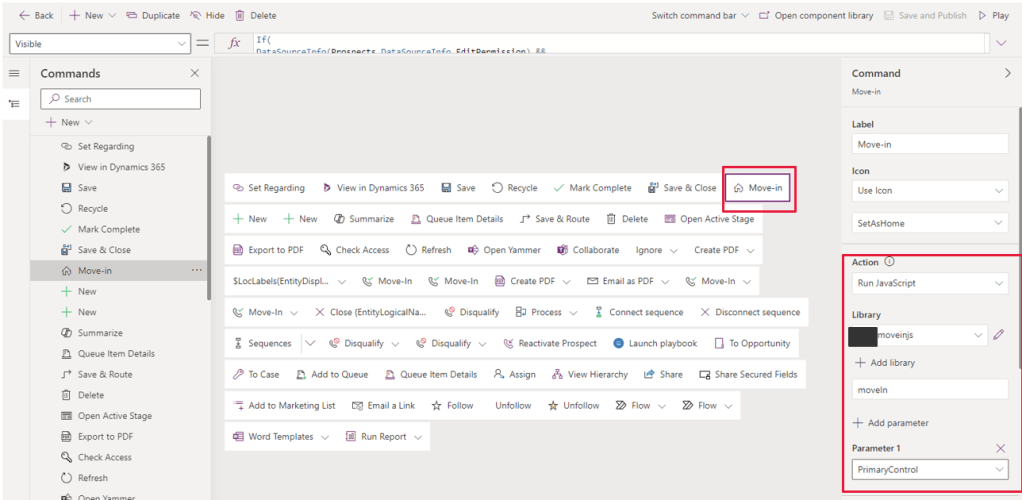
The script is saved as a web resource and invoked by configuring the button as below in the command designer:
2. Open a form
On the previous point, I used Xrm.Utility.showProgressIndicator to open up a progress dialog that blocks the UI, to let the user know that some process is going on. The function below, which runs when the status of the lead changes, will close the progress dialog through the method Xrm.Utility.closeProgressIndicator().
What happens next is that a form opens on a new tab using the method Xrm.Navigation.openForm(parameter). It launches a new tab only because the openinNewWindow property is true. If this was not specified, the form will open on the current tab.
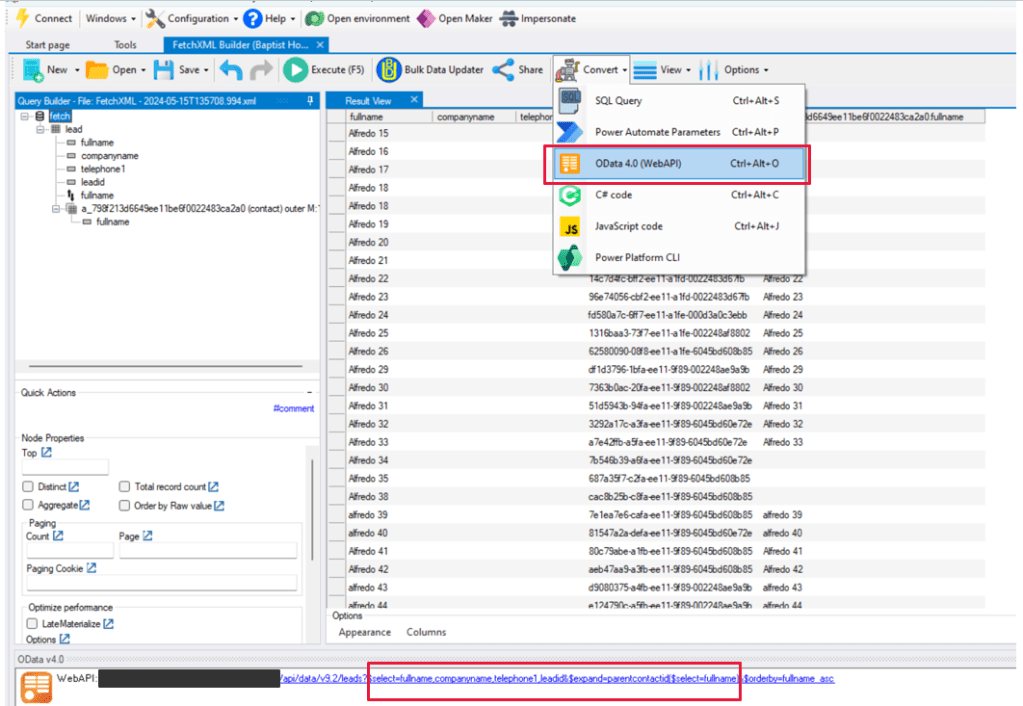
Another method I have found myself using a fair bit is the Xrm.WebApi.retrieveRecord(entityLogicalName, id, option), which, as the name suggests, retrieves one record. To generate the OData query that goes into its option parameter, I use FetchXML builder tool in XRM Toolbox and grab the select part of the generated query, which is what is needed by the option parameter.
    function qualifiedLead(formContext) {
        var prospectGuid = formContext.data.entity.getId();
        Xrm.WebApi.retrieveRecord("lead", prospectGuid, "?$select=fullname,statuscode,statecode,leadid,_parentcontactid_value&$expand=parentcontactid($select=contactid,fullname)").then(
            function success(result) {
                console.log("Retrieved values: Full Name: " + result.fullname + ", Status Reason: " + result.statuscode);
                console.log("Retrieved values: Master Contact: " + result.parentcontactid.contactid);
                if (result.statuscode == 3) {
                    //This block opens the contact form.
                    setTimeout(function() {
                        Xrm.Utility.closeProgressIndicator();
                        var entityFormOptions = {};
                        entityFormOptions["entityName"] = "contact";
                        entityFormOptions["entityId"] = result.parentcontactid.contactid;
                        entityFormOptions["openInNewWindow"] = true;
                        Xrm.Navigation.openForm(entityFormOptions).then(
                            function(success) {
                                console.log(success);
                            },
                            function(error) {
                                console.log(error);
                            });
                    }, 2000);
                }
            },
            function(error) {
                console.log(error.message);
            }
        );
    }
3. Run a custom page upon clicking a button
This is a re-usable code to run a custom page upon clicking a button. The button is configured as that shown in point #1, In which the Action property is set to Run JavaScript and then specifying the function.
function openMoveoutorTransferApp(primaryControl) {
    var formContext = primaryControl;
    var recordGUID = formContext.data.entity.getId().replace(/[{}]/g, "");
    console.log("Record GUID: " + recordGUID);
    var pageInput = {
        pageType: "custom",
        name: "new_moveoutortransferapp_123456", //This is where the custom page name goes.
        entityName: "contact",
        recordId: recordGUID
    };
    var navigationOptions = {
        target: 2,
        position: 1,
        width: {
            value: 50,
            unit: "%"
        },
        //height:{value: 550, unit: "px"},
        title: "Move/Transfer"
    };
    Xrm.Navigation.navigateTo(pageInput, navigationOptions)
        .then(
            function success() {
                formContext.data.refresh();

                //This block relaunches/reloads the form once the custom page is closed.
                var entityFormOptions = {};
                entityFormOptions["entityName"] = "contact";
                entityFormOptions["entityId"] = recordGUID;
                Xrm.Navigation.openForm(entityFormOptions).then(
                    function(success) {
                        console.log(success);
                    },
                    function(error) {
                        console.log(error);
                    });

            }
        ).catch(
            function error() {}
        );
}
4. Retrieve related records and hide a form tab based on the count
I often find myself needing Xrm.WebApi.retrieveMultipleRecord to tell me whether the current record has related records on a related entity and based on that, hide or display a tab on the form.
In the following code snippet, I have an entity called new_moveoutlog, which is on the N side of a 1:N relationship with the contact entity. It will find if there are rows on the new_moveoutlog connected to the current contact. If there is, it displays a tab; else, it hides it.
            //Count related moveout rows
            var fetchXmlMoveOut = "?fetchXml=<fetch mapping='logical'><entity name='new_moveoutlog'>" +
                "<attribute name='new_moveoutlogid'/>" +
                "<attribute name='new_name'/>" +
                "<attribute name='new_moveoutdate'/>" +
                "<filter type='and'>" +
                "<condition attribute='new_resident' operator='eq' value='" + contactGuid + "'/>" +
                "</filter>" +
                "</entity>" +
                "</fetch>";

            console.log("Fetch XML Query Moveout: " + fetchXmlMoveOut);

            Xrm.WebApi.retrieveMultipleRecords('bdo_moveoutlog', fetchXmlMoveOut).then(
                function success(result) {
                    if (result.entities.length > 0) {
                        moveoutTab.setVisible(true);
                    } else {
                        moveoutTab.setVisible(false);
                    }
                },
                function(error) {
                    console.log(error.message);
                    // handle error conditions
                }
            );
5. Retrieve related records and open an alert dialog based on the count
If I want the user to be reminded about adding related records on a subgrid, I would need Xrm.Navigation.openAlertDialog(alertStrings, alertOptions). This method will display a pop-up dialog.
The following function is invoked when the form loads. Again, as in #3, it is using Xrm.WebApi.retrieveMultipleRecord to determine existence of related rows. In this particular example, the entity new_interaction is in a 1:N connection with the new_interaction_account entity. If an interaction record is opened, the function is invoked and once it sees that there is no related row, the alert dialog will display.
    function relatedAccounts(formContext) {
        var interactionGuid = formContext.data.entity.getId();

        //Count related accounts
        var fetchXmlRelatedAccounts = "?fetchXml=<fetch version='1.0' output-format='xml-platform' mapping='logical' distinct='true'>" +
            "<entity name='new_interaction'>" +
            "<attribute name='new_interactionid' />" +
            "<attribute name='new_interactionsubject' />" +
            "<attribute name='createdon' />" +
            "<attribute name='new_interactiontype' />" +
            "<attribute name='statuscode' />" +
            "<attribute name='ownerid' />" +
            "<attribute name='new_description' />" +
            "<attribute name='new_startdatetime' />" +
            "<filter type='and'>" +
            "<condition attribute='new_interactionid' operator='eq' uitype='new_interaction' value='" + interactionGuid + "' />" +
            "</filter>" +
            "<link-entity name='new_new_interaction_account' from='new_interactionid' to='new_interactionid' visible='false' intersect='true'>" +
            "<link-entity name='account' from='accountid' to='accountid' alias='ad' />" +
            "</link-entity>" +
            "</entity>" +
            "</fetch>";

        console.log("Fetch XML Query Related Accounts: " + fetchXmlRelatedAccounts);

        Xrm.WebApi.retrieveMultipleRecords('new_interaction', fetchXmlRelatedAccounts).then(
            function success(result) {
                console.log("Related records count: " + result.entities.length);
                if (result.entities.length == 0 && interactionGuid.length > 0) {
                    console.log("There are no related records: " + result.entities.length);
                    var alertStrings = {
                        confirmButtonLabel: "OK",
                        text: "This interaction has no associated accounts yet. Please add at least one.",
                        title: "Related Accounts"
                    };
                    var alertOptions = {
                        width: 260
                    };
                    Xrm.Navigation.openAlertDialog(alertStrings, alertOptions).then(
                        function(success) {
                            console.log("Alert dialog closed");
                        },
                        function(error) {
                            console.log(error.message);
                        }
                    );
                } else {
                    console.log("There are related records or the interaction has not been created yet: " + result.entities.length);
                }
            },
            function(error) {
                console.log(error.message);
            }
        );
} Striving to Make Things Count